
Uploading an FSSAI lab report is a mandatory step for food manufacturers and importers under FSSAI Regulatory compliance.
Every food product batch must be tested in NABL-accredited laboratories, and the results must be uploaded to ensure approval, avoid delays at customs, and meet safety standards.
Yet, many food manufacturer struggle with incorrect files, mismatched product information, and not submitting report within deadline. myFssai solves this by offering an end-to-end compliance solution.
This guide explains how to raise an service request on myFssai. Till completing your documents upload in FSSAI portal.
Why the FSSAI Lab Report Matters in 2025
The FSSAI lab report verifies that the food product meets FSSAI food safety regulations for chemical, microbiological, and nutritional parameters. In 2025, FSSAI tightened digital compliance to prevent unsafe products from entering the market.
Your lab report must match:
- The product’s FSSAI license details
- Label claims under the Labelling & Display Regulations, 2021
myFssai ensures every report is checked with expert team, validated, and aligned before uploading reducing the risk of rejection.
How myFSSAI Simplifies the Lab Report Upload Process
myFssai functions as a technical compliance assistant, ensuring that your documents meet FSSAI requirements before they reach the FoSCoS portal.
Key capabilities include:
- Automatic validation against your FSSAI license
- Matching test parameters with product category
- Document formatting and structuring
- Compliance checks before final submission
- 24/7 tracking of report approval status
Step-by-Step: How to Upload Your FSSAI Lab Report Through myFssai
Below is the complete workflow designed for :
Step 1: Log into the myFssai Dashboard
Use your registered mobile number or email to access your business account. Your dashboard shows compliance alerts, pending uploads, and license status.
Step 2: Go to “License” tab
Here you’ll find the license number and click on your license number to add the product details under your business. And click on “Testing” and click on “Add new documents” to add all your testing documents.

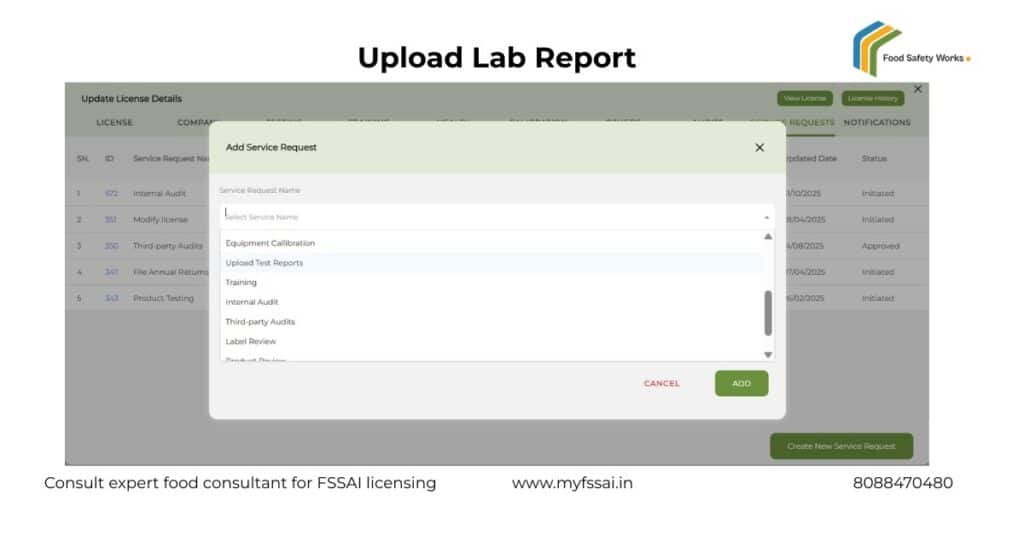
Step 3: Raise a Service Request
Navigate to “Service Request” tab and Click “Raise Service Request” → choose Lab Report Upload.
Our Technical Consultant team can contact you and coordinate with you, will be asked to provide:
- Product name
- FSSAI license number
- Batch number
- NABL lab report
- Label artwork (if applicable)
- Test category (chemical/microbiological/nutritional)
Step 4: myFSSAI Expert Review
A compliance specialist will:
- Validate your lab report
- Check document format
- Match details with your FSSAI license
- Ensure category compliance
- Verify if any corrective action needed before upload
This step prevents rejections during FoSCoS submission.
Step 5: myFssai Uploads the Report to FoSCoS
Once validated, the report is uploaded on the official FSSAI/FoSCoS portal under your license. You will receive:
- Upload confirmation
- FoSCoS acknowledgement
- Tracking updates
Step 6: Track Status in Real Time
Your myFSSAI dashboard updates automatically with:
- “Submitted”
- “Under Review”
- “Approved”
- “Action Required”
You will get instant alerts if authorities raise queries.
Benefits of Uploading FSSAI Lab Reports via myFSSAI
- Zero manual errors
- Faster approvals
- All documents safely stored in one place
- Automated compliance reminders
- Expert support for queries
- Complete audit trails for future inspections
Upload Your FSSAI Lab Report Now
Need expert help? Raise your lab-report upload request on myFSSAI for fast, accurate, and compliant submission.